Developer Guide
This developer guide is to help people working on RHoMIS 2.0, and potential new contributors, understand how RHoMIS 2.0 components generally work and how they interact with one another. It does not cover installation, testing, and contributions, nor does it cover the specifics of the source code. For a more in depth look at how to install, test, and contribute, we recommend looking at the GitHub repositories for each of the individual components.
Important Links
Below we have links to the repositories of RHoMIS 2.0 components and the API documentation. To learn more about how the whole system operates, please see the Developer Guide
User Facing Links
ODK central server: Go here to create projects, upload forms, and submit data. If you need to create an account please get in touch with Leo.
Data application front-end: After you have created a form and uploaded some data, go here and create an account. Once you login, you can begin querying data (will likely still be errors!)
Here is the link to the survey builder. (Unsure if ready to use)
Documentation
In addition to this documentation, which gives an overview of the RHoMIS system. Each of the individual repositories (see below) have their own specific documentation. We also have documentation on how to use the APIs:
Code Repositories
Summary of the RHoMIS 2.0 System
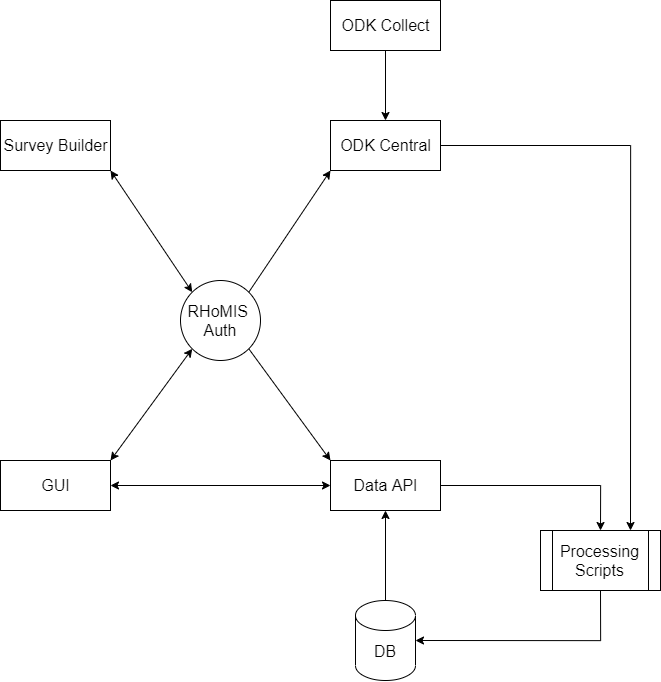
A summary of the RHoMIS 2.0 system components and how they interact.
RHoMIS 2.0 us made up of a series of interoperable applications. Users can interact with these components in a range of ways. However, generally we expect users to interact with components in the following order:
Survey builder
ODK system
Data querying dashboard (GUI)
Broadly, there are a few key tasks we expect users of RHoMIS 2.0 to carry out:
Survey creation
Project, form, and user management (administration)
Data collection
Data processing
Data querying and download
At the centre of the system we have the RHoMIS authentication API. This is used to manage users, projects, and forms. It ensures that all other components are up to date.
To simplify the system, we have broken the system down to show how it works for key processes.
Survey creation
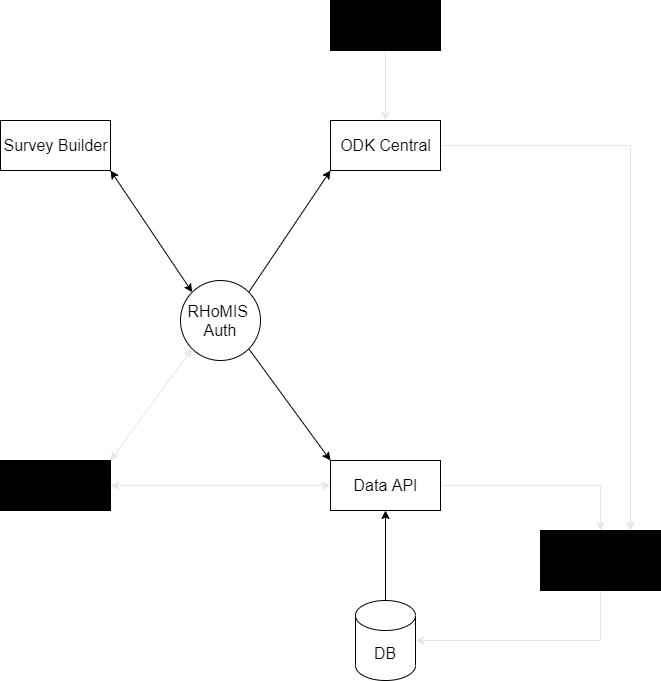
A summary of how components interact for the “survey creation” process. Irrelevant components and interactions have been blacke/greyed out. Please note that the survey builder has its own backend, where survey module information is stored. For more information, please see Survey Builder.
The user visits the survey builder.
They login or create an account
The survey builder sends a request to the authentication API.
If registering, the authentication service makes an account on ODK central. (The user can then login)
Once logged in, the user can create forms and projects.
Form and project creation is done through the authentication API. The authentication API stores project and form information, and ensures that this is added to the RHoMIS database.
Data collection
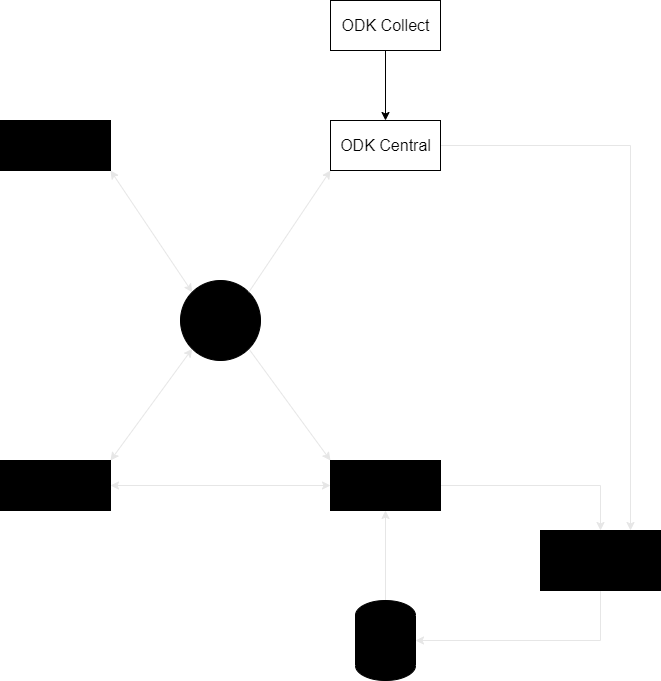
Data collection schematic.
For data collection and the management of raw data RHoMIS 2.0 currently relies on ODK collect and ODK central.
Users download the ODK collect application.
They configure the application using a QR code (currently only accessible through ODK central)
They collect surveys using ODK collect and upload them to ODK central.
Data processing
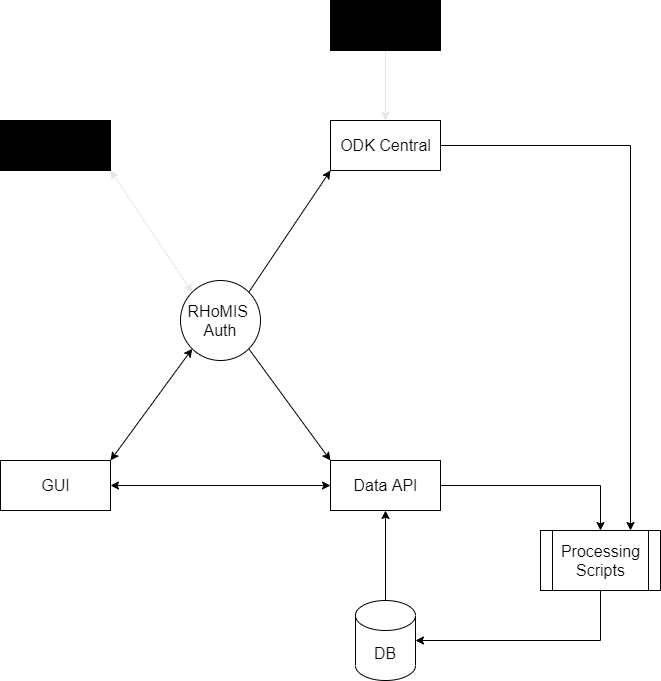
Schematic of processing steps
RHoMIS 2.0 relies on the R programming language for it’s automated processing, calculations, and reporting. An R-package has been developed for RHoMIS 2.0 data processing. This package, is designed for use on the data-processing server, as well as for use by the wider community who hope to analyse rhomis data themselves.
User visits the RHoMIS GUI
They login, and send a request to process their data
The request is then sent to the “Data API”
The “data API” calls the processing scripts (which mainly rely on functions from the RHoMIS R package)
The processing scripts pull raw data from ODK central. Process data and calculate key indicators through a series of queries.
The processed data and other outputs are saved to the RHoMIS database.
Querying and Download
The query and download interface calls the authentication API to obtain a user token.
This user token is then sent to the RHoMIS data API and decoded to identify the relevant user.
The user is then able to access their own project data and project-metadata through the API.